Home > Video to GIF > tutorial
Video to GIF Online Tutorial

How to get GIF animation from video?


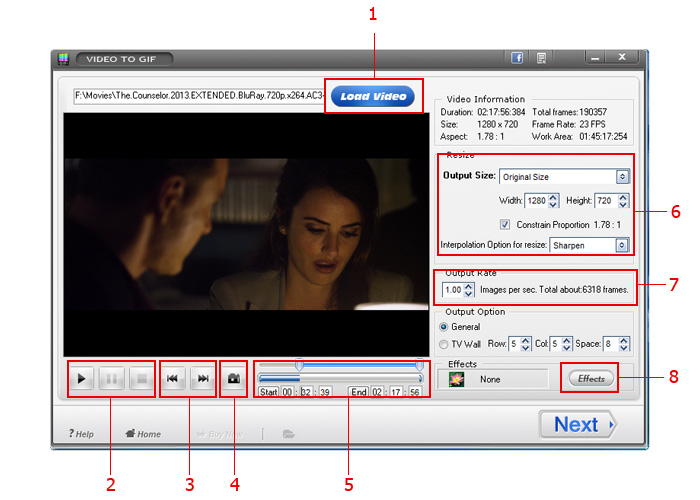
- Input a video file to program.
- Play the video
- Pause the video play
- Stop the video
- Next frame
- Previous frame
- Capture a picture from the video(for export single image)


- Control bar for video length
- Current scale to starting
- Current scale to ending

- Current time

Video to GIF Resize:

Video information, include video duration, total frames, video size, frame rate, etc.


Resize option


Output size option, we provide some popular szie, you can also input manual.


We provide 3 modes for reszie.

Smooth - Smooth edge without sawtooth, make picture looks vaguer.
Sharpen - Its effect is very good, between smooth and sawtooth, picture is distinct. This is a popular way.
Sawtooth - strong contrast, distinct picture, but you may lose some details.

Output Option:

Frame rate,if you input 5, so 5 picture per in a second.


Output option, we provide General and TV wall for you select.


Additional option.


Output format and path:


- If your select this box, pictures will save to original folder.
- If you select this box, pictures will save to new folder
When you selected "To Folder" ,you need click to select output folder.

Video to GIF Converter
Video to GIF
Customer Testimonials
"Thank you quick reply,my software worked well now, I like your software and the 19.9 dollars is fair price, have a good day! "

- Cheers kaye
Featured Products
Copyright © 2013 (watermark-software.com) of AoaoPhoto Digital Studio. All rights reserved. About | Privacy Policy | License Agreement | Sitemap
video to picture | video to gif | swf to gif | watermark software | photo watermark
photo watermark software - Adding watermarks to photos | video watermark software - Adding watermarks to videos